
Microsoft Ignite is the annual partner conference that the Redmond-based software company hosts. The mid-November 2025 conference exceeded 20,000 attendees, while estimates are that more than 10 times that many registered for online sessions (including yours truly). This event focused on demonstrating how Microsoft is implementing AI and its cloud platforms now.

The central theme with respect to Windows was Microsoft’s push towards an “Agentic OS,” in which it would gradually integrate AI agents into the taskbar and OS for proactive assistance.

Let me take a step back from all that geeky jargon and explain some things. First and foremost, OS stands for operating system – and that is all Windows is: an OS. Other operating systems include Linux and Google Chrome (on specifically built devices). AI stands for artificial intelligence. In this instance, it is the code Microsoft links to for specific questions and answers (basically the rules by which things should happen), based on their LLM (large language model) and a ton of code. Agentic is a trickier word. Most often, it refers to systems that can plan multi-step actions and adapt to changing circumstances independently. The simplest way to explain this is to remember the ESP-like qualities of Radar O’Reilly in the old MAS*H TV episodes, where he would automatically know – and state out loud – what his commander wanted done before it was even uttered.

Let’s put these various fragments together so they make some sense. Having an “agentic OS” means that Windows would know what you want to do and either help you or do it for you. I’ve worked with technology for a very long time, and I’m a child of the 1950s. Let’s go back 30 years (using the WABAC Machine – a Rocky and Bullwinkle reference) to recall that Microsoft gave us Office 97 and Clippy, a verbose (frequently maligned) assistant to help us work with Word and Excel. No one liked it!

Well, now, Microsoft plans to have a Copilot for Windows that will help you navigate settings and Windows updates and attempt to solve problems (some of which you might not even realize you have) to “fix” or “optimize” your computer.

Look, this is all really terrific, and quite frankly amazing, stuff. But most of what Microsoft is building is geared toward business users in large enterprises. When it comes to small- to medium-sized businesses and consumers, they’re implementing this stuff, and it is going to confuse the heck out of the “end users.” After an initial outcry, Microsoft agreed that it would not automatically turn on this AI support tool and would let it be up to the computer’s owner to say, “Yes, I want to let Microsoft know even more about how I use my computer, what files I have on it, who I communicate with over email, and what websites I visit.”

Ah, yes, the privacy issues. If you have an active AI agent running 24/7 on your computer as you do whatever it is you do, looking at all those activities, you’d have to be incredibly naïve to believe that you still retain your privacy. Microsoft will tell you they won’t use the data they are scooping up by the petabytes, but that’s not at all reassuring. I’m still waiting to see all the settings I must turn OFF to ensure client safety in future Windows releases.

Thanks, and safe computing!
The Identity Theft Resource Center (ITRC) supports victims of identity theft, fraud, and scams and offers identity protection education. Each year, they publish a report that summarizes the responses to the questionnaire they send to their constituents. In 2025, they aimed for a broader coterie of consumers and have collated those responses in a report that has me extremely concerned.

To clarify, the individuals who contact the ITRC are not merely victims of a credit card scam or phishing attack. They are individuals whose identity records have been hijacked by criminals — sometimes repeatedly — and who invariably undertake long-term processes to regain their financial stability. Let’s go through some of the findings.

The 2025 ITRC report shows that many of the victims they serve are more security-conscious before their victimization. Yet, they suffer catastrophic financial losses and face a grueling, frequently unresolved recovery process. Their experience fosters a deep skepticism of technological solutions, but they develop a sophisticated system-level understanding of the identity crime ecosystem.

For the general population included in the 2025 report, the primary form of attack is increasingly the compromise of their digital social lives. In contrast, the lives of ITRC victims are dominated by more complex and often financially oriented crimes.

ITRC victims reported that before their compromise, more than 50% used multi-factor authentication, more than 45% had already frozen their credit, and at least 30% did not reuse passwords across different accounts. Those statistics, to me, are shockingly high, and above what I consider “main stream.”
The fact that such a significant portion of this group was already employing strong security measures underscores the sophistication of the attacks they faced. These were not crimes of simple opportunity, but often targeted efforts capable of bypassing standard defenses.

By way of comparison, the general population reported lower adoption rates for the same critical defenses. The ITRC analysts believe that the decline in the use of basic protections may point to a growing “security fatigue” or a false sense of security among the public, thus creating a wider pool of vulnerable targets at a time when criminal attacks are becoming more sophisticated.

Any time someone becomes a victim of a fraud, phishing attack, or identity crime, it is a painful experience. Most people will use the event as a starting point for behavioral change, but “most” isn’t everyone. The ITRC analysts think the intensity of the victim’s response is directly proportional to the severity of the trauma experience. In other words, a less complex incident may prompt a password reset or update, whereas systemic financial fraud forces a complete and lasting re-evaluation of one’s entire digital footprint.

When it came time to quantify the economic impact that crime victims faced, the numbers ran through an entire spectrum. Nearly 20% of both ITRC victims and the general population got “hit” for less than $500. However, the ITRC reported receiving reports of victims who lost funds up to and exceeding one million dollars.

Because the ITRC case load is skewed to helping erase these life-altering financial events, the year-over-year increase in high-value losses across both sets of victims is a critical finding. Analysts suggest that criminals are becoming increasingly adept at monetizing stolen identities and successfully extracting larger sums from victims across the board — regardless of the initial point of compromise.

How confident are these people when it comes to trusting artificial intelligence (AI) to protect them? Actual ITRC victims — having been failed by existing security systems — are profoundly skeptical of this supposed technological silver bullet. In the general population, while most are cautious, they show a greater willingness to place faith in AI solutions. This belief may stem from a less severe breach of their personal sense of security. It may not have exposed them to the systemic, multi-layered failures that ITRC victims often endure during their protracted recovery efforts.

And why is that? Because in both this year’s and last year’s reports, nearly 50% of victims had cases that remained unsolved. Many cases that get resolved take months or even years of persistent effort.

What does this mean for the victims of identity theft? They cannot lease or purchase a car. Their credit (as reported by the three major companies) is in a shambles. They often struggle to rent an apartment or buy a new home. In many cases, they are emotionally detached, and (new to this report’s findings) more than 20% are thinking in terms of self-harm.

Still think you are cyber safe? If you’ve been reading my newsletters, you know I have harped (ad nauseum) about being careful and how you can use best practices to improve your online security and reduce your risk. The ITRC recently created a quick quiz for everyone to test their knowledge by answering a few questions. You’ll even be able to download a PDF version of your results. If you’d like to send me your report, I’ll take the time to provide comments.

You can find the quiz here: https://www.idtheftcenter.org/are-you-cyber-safe/

Thanks, and safe computing!

Microsoft has been the subject of many jokes about the security of its Windows operating system for decades. Some criticism is warranted; however, the Redmond, Washington-based organization has maintained a steady cadence of stating they will improve Windows and deliver something that approximates the management objective.

All that increased security in Windows made resolving the problem that the failed definition files CrowdStrike released much more difficult. Let me explain.

CrowdStrike offers a security product called Falcon. Its job is to protect an enterprise computer from being taken over by malicious software. One set of files deployed globally on July 18, 2024, were corrupt. When Windows performed normal operations, several elements failed, and the operating system gave up, resulting in what is known in the IT industry as a BSOD – or Blue Screen of Death.

The instructions CrowdStrike eventually provided to systems administrators after they recognized the problem was to boot the failed computer into Safe Mode, delete the bad files, and reboot the computer. That way, when the computer resumed regular operation, it would obtain a clean set of files from CrowdStrike and behave normally.

So, what’s the big deal? These steps — at least at first glance — seem elementary. Well, there are some problems with this approach.

Safe Mode

Microsoft introduced Safe Mode as a mechanism to let people resolve problems in a stripped-down form of the operating system. When you start Windows in Safe Mode, the operating system does not load start-up programs or third-party applications and drivers. Only the most essential device drivers and files necessary to run the operating system are activated.

You could access Safe Mode shortly after starting your computer by repeatedly pressing the F8 key. This process worked for generations of operating systems, from Windows 95 through Windows 7.

The mechanism to access Safe Mode changed, starting with Windows 8 and continuing with Windows 10 and 11, which Microsoft touts as more secure operating systems. Most people need to access Safe Mode because the operating system won’t start properly, so the fact that Microsoft provides two very different ways to access it from within Windows indicates that someone wasn’t thinking about actual problems faced by the masses.

To access Safe Mode from a “cold start” means turning on the computer and immediately holding down the power button so the start-up is interrupted and the computer shuts down. Do these steps two more times, and you should see a pop-up with the words Startup Repair. You then must select Advanced Options, Troubleshoot, Advanced Options, Start Up Settings, Restart, and then choose from the available Safe Mode options.

It seems as if Microsoft developers designed this process to prevent anyone from accessing Safe Mode. And yes, that means that technicians had to jump through these hoops just to get started to fix the CrowdStrike problem.

But that wasn’t all that stood in the way of quickly resolving the issue.

BitLocker

BitLocker is a Windows security feature that will encrypt the contents of the hard drive on which the operating system is installed. This advanced functionality mitigates unauthorized access to a computer’s operating system drive. By password-encrypting a computer’s operating system drive, you can keep your files (and personal information) secure and protected from unwanted access.

When you activate BitLocker, Windows creates a recovery key for your hard drive so that each time you start your computer, you must provide a PIN to gain access. In an enterprise environment, that recovery key is stored in the site’s Windows Server Active Directory. And therein lies the problem.

To gain access to any device with a BSOD, a technician requires the 16-digit BitLocker key. The problem is that most of those keys are securely stored in Windows Servers, which were likely unavailable because they also experienced a BSOD. Even after technicians restored those servers, a corporate environment has hundreds or thousands of computers, and no script can automate the entry of a device’s BitLocker key – the work must be done manually.

And that is why the CrowdStrike problem was so challenging and time-consuming to resolve. The requirement to increase Windows’ security prevented a simple fix. Teams of IT specialists worked throughout the weekend to attempt to recover their company’s computers by repeatedly — and manually — going to Safe Boot, entering the BitLocker key, deleting files, and rebooting.

Several pundits have commented that CrowdStrike Falcon’s use of definition files is no better than Norton Antivirus and its signature files. As many of you know, I have stressed the need for a more thorough and heuristic approach to computer security, and using definition files is not the way to handle this.

I am incredibly proud that my choice of security vendor, SentinelOne, does not use any form of definition file. For years, it has been fantastic at keeping all my clients’ computers and servers safe. Having dodged a significant bullet, I don’t want to jinx things by saying nothing bad will ever happen. Ultimately, we all want a secure Windows operating experience and do not have to go through an unexpected nightmare.

Thanks, and safe computing!

US government officials have placed a deadline of September 29, 2024, for all users of Kaspersky software to find an alternative before a ban occurs.

Here’s why this is important. Kaspersky uses signature files to identify threats. In 100 days, they will no longer be updated. As bad actors continue to evolve their threats, the software will not be able to keep up. In effect, it will become useless. Computer users running Kaspersky antivirus will no longer be protected.

As a Managed Services Provider, I have never suggested or promoted using Kaspersky as an antivirus or internet security product. I recognize it comes preinstalled on many computers sold by big box stores (e.g., Staples, Best Buy). Starting a subscription to a product that came with your computer is much easier than figuring out a new or different one.

However, the latest generation of threat protection doesn’t use signature files. It uses artificial intelligence to recognize valid programs from rogue software. These security products view the totality of your computer’s operations to determine if something unusual is occurring (like encrypting files or contacting a foreign command and control center) and stop that activity.

As you know, I have evaluated many security products over the years and rely on SentinelOne and Huntress as the most practical combination to protect computers in a home and business environment. These products take unique approaches to identify and eliminate threats without using old-fashioned signature updates. SentinelOne uses the activity of known programs to identify those operating in an aberrant or unsafe manner. Similarly, Huntress will quash any activity that appears to be suspicious.

If you know anyone who has Kaspersky installed on a home computer, I suggest you tell them to take the following actions:

  • Access your Kaspersky portal and stop auto-renewal and auto-payment on your credit card.
  • Uninstall the Kaspersky software using the Windows Control Panel > Programs > Uninstall a program function. This action should automatically re-enable Microsoft’s built-in Defender application.
  • Go to the Windows Security Center, ensure Microsoft Defender is activated and updated, and scan your computer. Defender, while it uses signature updates, gets those automatically from Microsoft.

If you know of any small business owners that have Kaspersky installed on their office computers, please ask them to get in touch with me immediately. When they sign up for a SentinelOne and Huntress subscription between now and September 29, I will waive the $95 implementation fee!

Thanks, and safe computing!

I genuinely want to keep you safe and secure, but I realize it is a considerable task that gets more formidable with each passing day.

Last month, I sent you a brief email describing a threat posed by the ScreenConnect software. A researcher discovered a flaw that could allow unauthorized access to the software. While the vendor quickly confirmed and then fixed the problem, the true breadth of the issue soon became apparent. With two versions extant, ConnectWise had to ensure they patched the cloud version quickly and notified everyone who had purchased licenses for the server-based version to patch their instances.

I am grateful to use the cloud-based version because I didn’t have to lift a finger to install the patches. On the other hand, during a blizzard of pop-up webinars given by various security providers, including Huntress, I learned that hundreds of systems are running older versions of ScreenConnect, and ConnectWise has no contact information. Emails they sent to alert people were treated by Microsoft’s Exchange and Outlook as spam, thus not reaching the intended recipients promptly.

In some cases, servers were compromised, and bad actors accessed attached client computers. No one knows what information was exfiltrated, nor what hidden threats were left behind. I work in a world of acronyms, and one that I frequently heard last week was IOCs. That abbreviation stands for “indicators of compromise,” meaning the digital and informational “clues” that incident responders use to detect, diagnose, halt, and remediate malicious activity in their networks.

By the end of the week, a significant news story was that the healthcare giant UnitedHealth Group had to shut down the IT systems at its subsidiary Optum because of a ransomware attack. Optum Solutions operates the Change Healthcare platform, the largest payment exchange platform among doctors, pharmacies, healthcare providers, and patients in the US healthcare system. As more information came to light, analysts believe a group of bad actors took advantage of an unpatched ScreenConnect server and ran roughshod over the entire network.

I will assume an organization as large as UnitedHealth Group has a valid incident response plan (IRP) and that pulling the network plug on their computer systems was the first step. Next, of course, was to contact their insurance company and establish a remediation task force. But what about smaller organizations?

How does a one-person MSP or a 10-person firm handle this? I will spend the next few months making certain that my IRP is updated to account for such an incident. As I edited a penultimate version of this newsletter, an email arrived from the New Jersey Cybersecurity & Communications Information Cell (NJCCIC) about Russian SVR actors targeting cloud infrastructure. The email goes on to say:

The NCSC has previously detailed how SVR cyber actors have targeted governmental, think tank, healthcare, and energy targets for intelligence gain. It has now observed SVR actors expanding their targeting to include aviation, education, law enforcement, local and state councils, government financial departments, and military organizations.

Even though I don’t use a server-based version of ScreenConnect, I now feel it necessary to include additional “what if” scenarios in my IRP to ensure thorough coverage.

Thanks, and safe computing!

For the past eight years, I have used a software product called Reflexion (from Sophos) to scan my email for threats. The product offered some wonderful features that enabled me to pursue my business without major threats of ransomware and business compromise emails. Regrettably, Sophos decided to retire the product earlier this year. I was not satisfied their replacement had all of the features and functionality I had become used to, so I searched for an appropriate replacement.

I found Proofpoint and, despite a significant effort on my part to transition, really like how this product is helping keep me and my computer network safe from email-based threats.

Proofpoint scans all incoming emails and rates them on a threat score. This cloud-based product holds the suspect emails in quarantine, and I receive an activity summary each morning. When I review this list, I can block or release (and approve) as needed. This functionality gives me great peace of mind that nothing malicious will hit my computer.

Another significant product feature, URL Defense, analyzes and re-writes hyperlink URLs. The feature scans and refactors all URLs to protect people from malicious websites. For example:

https://www.reddit.com/subreddit/article/topic

would become:

https://urldefense.proofpoint.com/v2/url?u=https-3A__click.redditmail.com_CL0.

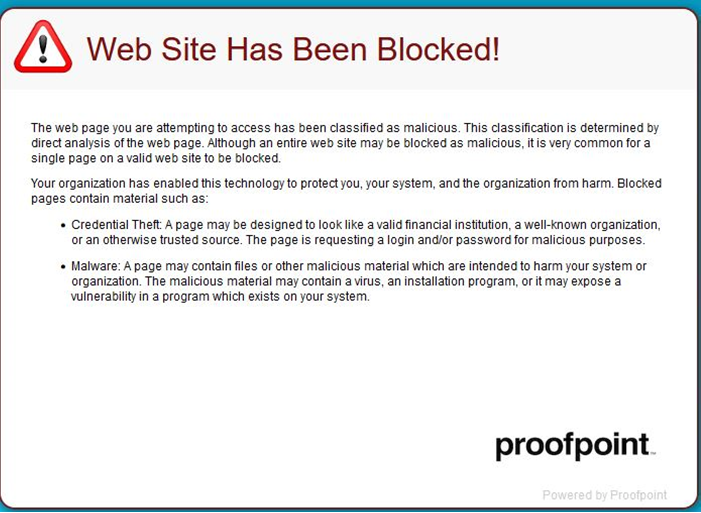
The other day I received an email that made it through the standard filter. It was for “pre-approval of a $372K loan” for my company. I was surprised it made it through, but there was nothing inherently wrong with the email contents. I looked for and found the link to unsubscribe from their garbage. At this point, I was so grateful to be using Proofpoint because I received a pop-up window (shown below) indicating the link was for a malicious website.

Proofpoint block

Honestly, this is the first time I’ve seen Proofpoint pop up, and I was both thrilled and scared simultaneously. It was obvious that the bad actors had taken advantage of my normal human response to subject my computer to malicious software based on my decision to avoid getting more emails from this organization. I shook my head at the audacity of the threat and how I had circumvented it.

My SonicWall firewall would have prevented malicious code from being downloaded. SentinelOne would have reacted immediately had any unwarranted programs started taking abnormal actions and reaching out to websites out of my ordinary purview. The bottom line is: I dodged a bullet, and my computing environment is still safe.

I have to wonder: What would have happened in an unprotected computer? What might have occurred in a small business that didn’t have a firewall or SentinelOne? I’m guessing the results would not have been good. The business owner would have called some IT person or company asking if they could help recover a computer — because someone thought they were doing the right thing.

I have blocked the sender’s address to ensure I don’t receive any more emails; however, countless other bad actors will continue to attempt to gain access and run roughshod over any willing victim.

My final words on this are simple: If you do not know the sender of an email, you must consider them suspect. In the past, I would have assured you that clicking the Unsubscribe link was sufficient to remove your name from a mailing list. Now, I’m changing that advice. If you don’t know who sent it, delete it. That will save you endless heartache and grief from potential problems.

For small business owners who own their web domain or email accounts, even if you use Google Workspace or Microsoft Office 365, I recommend you add Proofpoint to your existing SHADE subscription. This low-cost, high-value offering is something that could help prevent problems from occurring on your network.

Thanks, and safe computing!

Password managers are programs that let you store an ever-growing list of online credentials in a safe location. These programs remove the need to record this information insecurely, such as by emailing them and writing Post-it Notes.

Many security experts advise clients to use these programs as part of best security practices because they also let you create strong and unique passwords for each online account you have. Additionally, some programs alert you if you duplicate a password across different accounts and can notify you if your password has appeared in a known data breach.

However, if your program’s secure vault is compromised, it potentially puts every one of your online accounts at risk of compromise. This issue drew my attention following last year’s extensive LastPass breach incident.

In 2022, there were multiple breaches at LastPass. In addition to putting the response and actions of LastPass under the spotlight, the incidents have raised questions over the safety of storing multiple login credentials on password managers altogether.

LastPass announced in late August 2022 that “an unauthorized party gained access to portions of the LastPass development environment through a single compromised developer account.” This enabled the attacker to take portions of source code and some proprietary LastPass technical information.

After conducting an investigation and forensic review, LastPass said it found no further evidence of activity from the threat actor. The unauthorized access was limited to its development system, which is “physically separated” from its production environment.

At the end of November, they made another announcement that an unauthorized party had gained access to a third-party cloud storage device. This new breach was enabled by the information gained by the attacker during the original August incident.

And a few days before Christmas, the firm informed users that attackers had accessed encrypted customer data (username, password, and notes) and unencrypted data (the website addresses of customers’ online accounts).

Do I believe you should keep your LastPass account following this last episode? No, but the damage has already been done. There is a high likelihood that your account may have been compromised. But if you want to continue to use LastPass, there are three things you must do to continue using the service.

  • First, you must strengthen your master password and ensure it is unique, long, and complex.
  • Second, as an extra security precaution, you should change the passwords for the websites you have stored in the service.
  • Third, you should be on the lookout for targeted phishing attempts in the coming months, with the attackers accessing your unencrypted contact information and websites.

I have reviewed these services over the years and have not found one I have felt entirely comfortable using – and I have not only my accounts to manage but many of my client’s accounts. I hate to say it, but the safest and most secure way of managing your passwords is to use a notebook and write them down.

If you use a document or spreadsheet and your computer is ever compromised, you will lose that information, and bad actors will use it against you.

What is the best way to implement this Luddite approach? Have one page per account, and write the name and website address at the top. Have a one-line entry per password, preferably with the date you first used it. If you must change a password, cross out that line, and write a new one along with the date, you created it.

The more complex we have made our lives by thinking that computers would make things easier for us, the more I think we need to use simple methods to maintain our security.

Owners of and partners in small businesses, please take heed: It’s time to revisit your cyber policy.

Most of you think, “Thanks for the advice, but that won’t be necessary.”

Some, if not all, will say, “Cybersecurity is a concern. We’ve seen how ransomware has been in the news and affected local organizations. But don’t worry; we have it under control.”

I’m sorry to say that willful ignorance will not work.

Why? Because despite frequent newsletters and emails from Managed Services Providers (MSPs) like myself, many business owners disregard the hard work required to ensure their business remains operational.

Also, last year’s cyber program will not be enough to address tomorrow’s cyber challenges. Even if your business has successfully addressed cyber-attacks and ransomware threats, newer, more vicious dangers will arise. Sadly, the bad actors are improving as fast or faster than the good guys.

Neglecting cybersecurity can:

  • Undermine the reputation of your business with your clients.
  • Force unacceptable expenditures associated with cleaning up after security breaches.
  • Cripple your ability to conduct your daily business until the threat has been identified and remediated — costing you thousands, if not hundreds of thousands, of dollars.

So, what steps can you take?

To begin, I’ve never met a business owner who said that cybersecurity is unimportant. While true, I’m exaggerating. Most business owners don’t necessarily consider it a priority, if at all. But they acknowledge actions I take, like patching their servers and desktop computers and offering business continuity and incident response plans, are essential.

However, their actions often don’t match their words. I frequently encounter a business owner who checks off the box when their insurance comes up for renewal without giving more thought to the problem.

My job is to make cybersecurity a priority and a core part of everyone’s business environment. In some cases, you will hear me discuss cyber protections more than I have in the past — only because I’ve seen some ramifications when businesses fail to heed common sense measures. Business owners should want advisors on how to lower the risk to their business. Often, that’s not the case.

Next, some business owners think cybersecurity is just a minor aspect of technology. But cybersecurity is a business risk issue that will either strengthen or harm your business. Security experts agree that what is needed is a robust system of training, followed by understanding and actions that start with the business owner and that all employees or staff follow.

There are many ways to improve cybersecurity risk management. These methods include identifying, protecting, detecting, responding to, and recovering from inevitable cyberattacks. But irrespective of your procedures, your employees, clients, business partners, vendors, and others you interact with need to see you — as a business owner — step up and lead those cybersecurity measures.

The start of a new year is a perfect time to realign — or even start over — on cybersecurity. Theodore Roosevelt once said, “In any moment of decision, the best thing you can do is the right thing, the next best thing is the wrong thing, and the worst thing you can do is nothing.” Just make sure you do something!

Thanks, and safe computing!

In 2017, there was a security breach at the credit reporting firm, Equifax. This breach was significant news at the time, and by 2019 the company agreed to a $425 million settlement of several class action lawsuits. They offered credit monitoring or a cash award of up to $125. At the time, I recommended the former.

In the closing days of December 2022, Equifax began to issue those cash awards. Many people found the amount they received laughable (e.g., most claimed to receive less than $10). However, scammers immediately went on the alert and into action. The website DomainTools.com reported several new domain names, which closely resembled the legitimate one, had been registered in just a few days. The valid website name is equifaxbreachsettlement.com. Fake versions include equifaxbreechsettlement.com, equifaxbreachsettlementbreach.com, and equifaxsettlements.co.

If you get an email notification about payment, do not click on the link in the email. It would be best if you went directly to the legitimate website and manually entered the keycode shown in your email. These instructions also apply if you get a letter in the mail.

Of course, because everyone’s information was made publicly available, scammers know who you are. If you get an email that seems slightly off and want to learn if it is “real,” please forward it to me for verification. Doing so is not an intrusion on my time. I would much rather spend a minute or two to review the contents of an email, than spend several hours — or days — working to restore your stolen identity.

Thanks, and safe computing!

There is little doubt that cybercrime is becoming more complex, and ransomware and data breach events are becoming more frequent. As a result, many small business owners have become concerned that they will soon be victims. Some have looked to IT solutions providers, like Heliotropic Systems, to help deal with these evolving threats. That is why it is vital for me to understand the current state and emerging trends of that threat landscape and what tools I can use to combat them.

Let’s look at the cybersecurity landscape and analyze the threats, trends, and opportunities.

Protecting Small Businesses from Ransomware Attacks

Cybercriminals are increasingly targeting small- to medium-sized businesses (SMBs). In 2021, more than 40% of all cyberattacks were against small businesses. Digging deeper into that statistic, researchers have found that of those attacked, approximately 60% will go out of business six months following an attack. The primary reason is that so many SMBs don’t have the resources to support an internal IT and data security operation.

In almost all of my security vendor recent annual reports, the most common threat was ransomware. The second tier threat was data breach. To combat these insidious hazards, I must be proficient in three areas.

Prevention

The primary goal is to eliminate the threat of an attack in the first place. While I fully acknowledge there is no “right” way to do this, there are measures I take to help keep my clients from becoming ransomware victims. I recently added Huntress (a threat detection tool) to my portfolio. You subscribe to SPF+ (for consumers) and SHADE (for small businesses), which enables automated patch management to fix potential vulnerabilities as soon as they are discovered.

Another significant measure is to constantly remind clients that rather than click on a link or respond to a suspicious email, you should call me for confirmation. The other day, someone said they received an invoice for three years of Norton Lifelock. No, they didn’t — they received a scam email. It was de-
signed to obtain sufficient information to make fraudulent charges on their credit card.

Detection

I’d be remiss if I didn’t acknowledge that ransomware can still get through the protection layer despite my best efforts. That’s why I have measures in place to identify when ransomware is present, rather than assuming an attack will never be successful. The earlier I can detect it, the sooner I can take action to eliminate it.

Response

When ransomware is detected, responding to the attack, and eliminating it must be done with the utmost efficiency. Some of the steps I must take include:

  • Scan the network for confirmation of an attack unfolding.
  • Identify the infected computers and isolate them from the rest of the network.
  • Secure all backup data or backup systems immediately.

I feel good knowing I have a significantly positive affect on my clients’ businesses by optimizing ransomware prevention and detecting and quickly responding to attacks. Ransomware attacks were estimated to cost roughly $20 billion in 2021. My aim is to save my clients from suffering any financial damages that would hurt their business.

Finding the Right Tools to Combat Ransomware

All my small business clients trust me with access to critical systems and data. They feel protected because they know I will act swiftly and effectively when a threat arises. To accomplish this, I have – over the years – sought to obtain the necessary tools that will facilitate quick and decisive action.

For example, remote monitoring and management (RMM) provides me with access to your computers so I can keep them secure, patched, and operational. I can proactively fix any vulnerabilities before you are attacked with automated patching, whether it is from Microsoft or third-party vendors, which helps optimize ransomware prevention efforts.

But, again, the idea is always to be prepared if ransomware attacks are successful. SentinelOne takes the next step of ransomware defense by including native ransomware detection. It constantly monitors for crypto-ransomware and attempts to kill the malicious software, thus reducing the impact of an attack. You (and I) get alerts at the first detection of crypto-ransomware, and I can automatically isolate any infected computer.

The ability to detect ransomware immediately enables me to execute an action plan sooner rather than later. And I know ransomware infections can cause extensive damage, which may prove too costly for many small businesses to overcome.

Of course, no ransomware response plan is complete without a system to protect the most vital company resource – its data. Regularly backing up data can reduce the risk of downtime when a ransomware attack is successful, but the backup system must be secure and reliable. The Datto Vaults I deploy at client sites are designed to protect physical, virtual, and cloud infrastructures and data. The data is well protected and easily accessible, so I can recover it rapidly when needed. The Vaults also have software that detects ransomware within backups, saving me (and my clients) time locating the last clean system restore point.

Leveraging Security Services to Help You Grow Your Business

Most of my colleagues will tell you that they are all focused on security on many levels, whether securing computers and networks, protecting data, or understanding how to be better against the threat of ransomware. Security threats will never go away – we can only keep them at bay. I believe I can effectively protect my clients and ensure their businesses thrive with the multi-layered security tools I have deployed.

Thanks, and safe computing!